The APM32E103 series integrates 512KB of 55nm eFlash, capable of running at up to 120MHz with wait states. It also supports basic protection and option byte configuration features. To successfully enable code read and write protection, please pay attention to the configuration of the option bytes. These option bytes are placed in the system memory area and are not affected by a full-chip Flash erase.
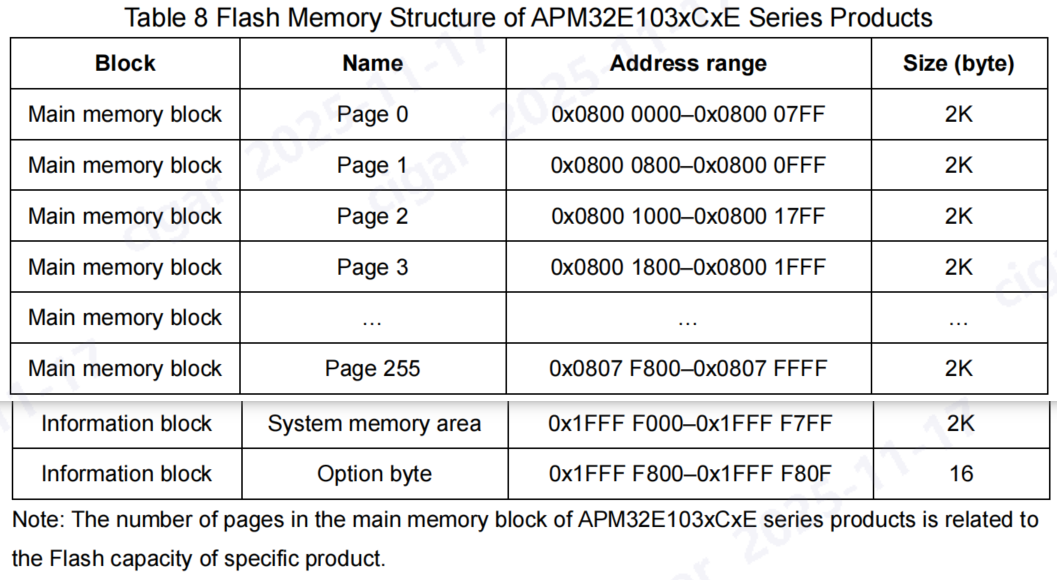
- Contain main memory area and information block
- The capacity of main memory area is up to 512KB
- The information block is divided into system memory area and option
- byte
- The capacity of the system memory area is 2KB, for storing
- BootLoader program, 96-bit unique UID, and main memory area
- capacity information
- The capacity of the option byte area is 16Bytes
The option byte provides some optional functions for users, and it mainly consists of 8 configurable bytes and corresponding bit complement value. Every time the system is reset, the option byte area will be reloaded to the FMC_ OBCS and FMC_WRTPROT register (the option byte will only take effect each time they are reloaded to FMC).
The functions include:
- Read Protection: 2 levels, no protection or basic protection, when the Option Byte is not 0xA5, Flash cannot be read out, and the full chip will be erased while the programmer removes the read protection.

Hardware/Software Watchdog Select
Reset Generation When Entering STOP/STANDBY (WFI or WFE, DEEPSLEEP)

2 Bytes of User Data, at System Flash Area 0×1FFFF804, 0×1FFFF806.
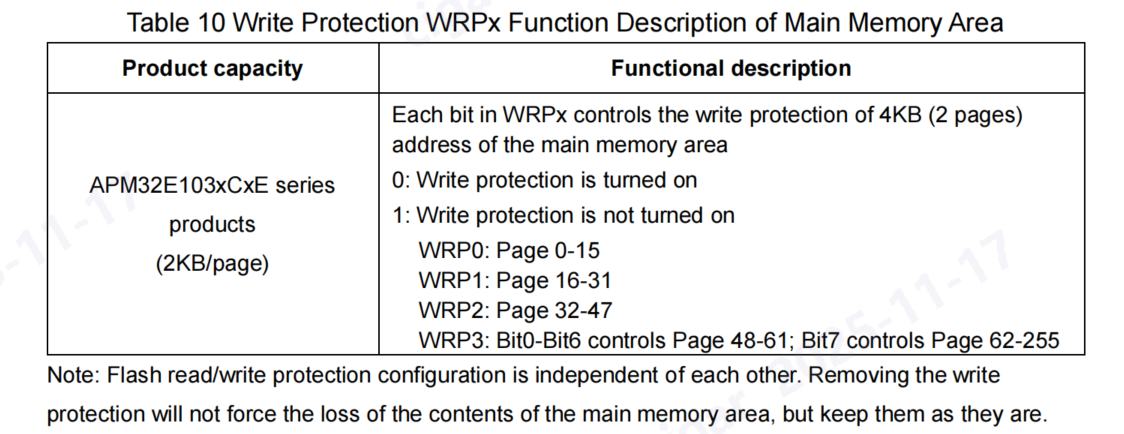
Write Protection: 1 Page per bit, on APM32E103, 2KB per bit.
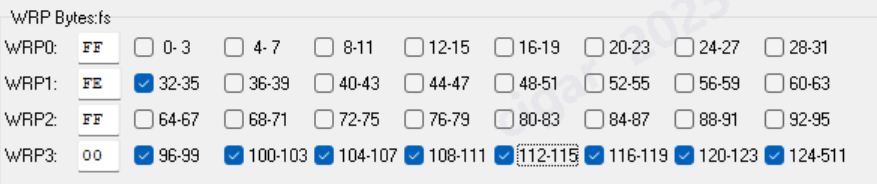
To perform write operation (program/erase) for the option byte block, first write the correct key sequence (the same as that of locking) in FMC_OBKEY, and then allow the write operation of option byte block; the OBWEN bit of FMC_CTRL2 register indicates write enabled; clear this bit and write operation will be disabled
The KEY value is as follows:
KEY1=0×45670123
KEY2=0xCDEF89AB

When performing write operations on the option byte area, it is critical to correctly handle specific control bits in the FMC_CTRL2 control register located at address 0×40022010.
Two bits in particular must be carefully managed:
**Bit 9 (OBWEN) — Option Byte Write Enable
This bit controls whether write operations to the option byte block are permitted.
By default, write access to option bytes is disabled to protect against unintended modifications.
Before attempting to program or erase option bytes, you must set OBWEN (bit 9) to 1 to enable write accessd; _clear this bit and write operation will be disabled_.**

Bit 4 (OBP) — Option Byte Program Start
After writing the desired option byte data to the option byte memory space, you must set OBP (bit 4) to 1 to initiate the programming operation.
This bit triggers the FMC hardware to start programming the option bytes with the new data.
The OBP bit is automatically cleared by hardware once the programming operation completes.

The option byte does not support “software lock”. The user should pay special attention to that every time after the value of the option byte is modified, the system must be reset to make it effective.