Dev-1997
Regarding your request, please note that we do not publicly disclose the communication protocol details of the chip’s internal Bootloader at this time.
However, you can download the GeehyProg software from the Geehy official website to achieve your goals.
This tool supports ISP functions, and for specific chips with USB capabilities, it also supports DFU functions.
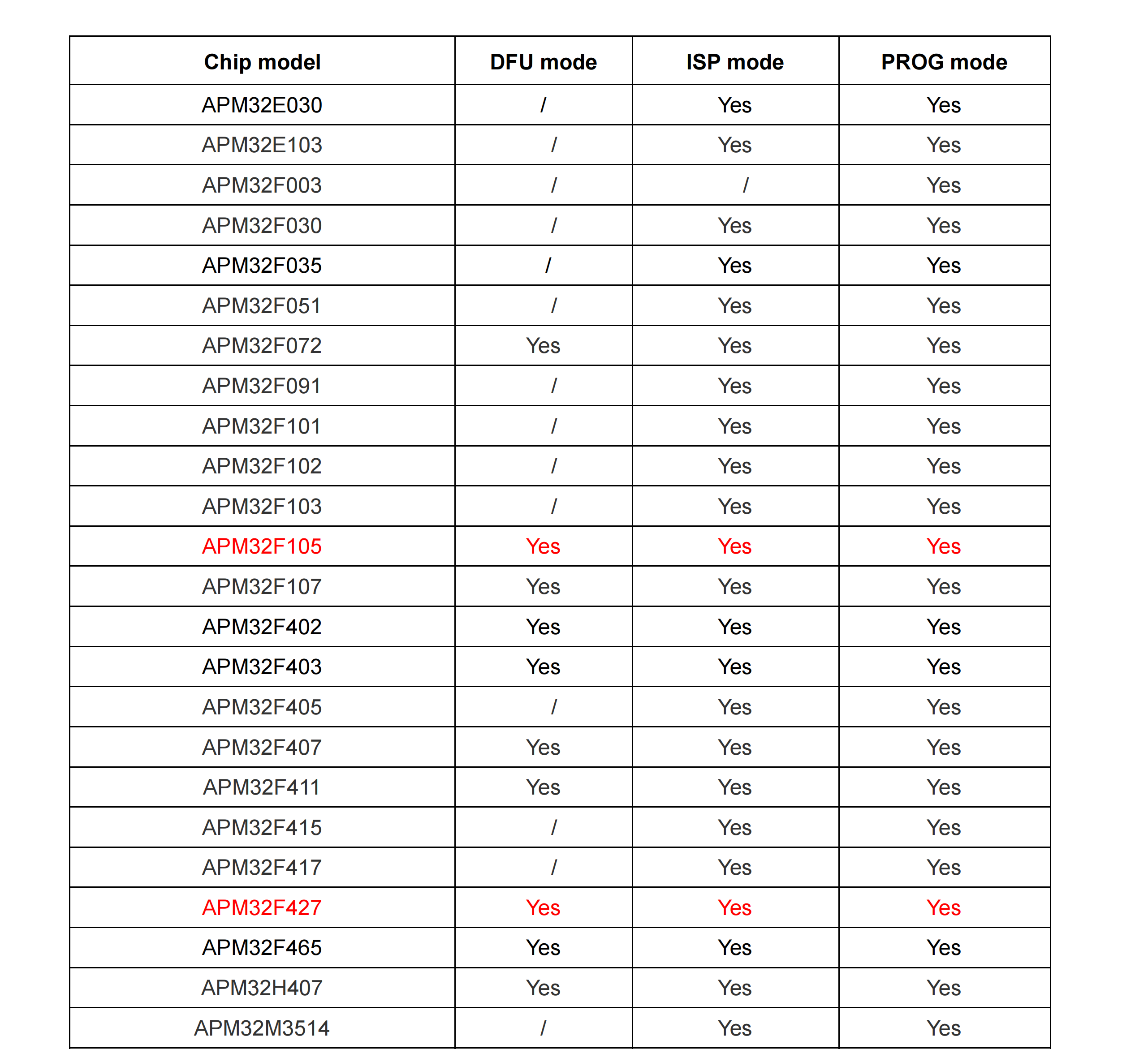
For ISP: You need to connect via a USB-to-TTL adapter to the chip’s UART pins (PA9: UART_TX, PA10: UART_RX). We recommend keeping the baud rate between 1200 and 115200.
For DFU: A hardware connection compliant with the USB 2.0 standard is required.
How to enter Bootloader mode:
To bootstrap the chip into the ISP/DFU Bootloader, please set the BOOT0 pin to High and keep the BOOT1 pin at Low at the moment of chip reset.
In this mode, user code will not be actively executed, allowing you to use GeehyProg on a Windows PC to write and read code.
Please find the GeehyProg user manual attached.
You can download the software via the link below:
https://global.geehy.com/design/hardware_detail/43